close
filter_list

Bitwig Connect 4/12

Description

The Essentials to Know About the Bitwig Connect Audio/MIDI Interface

  • Three-in-one solution: USB audio/MIDI interface, DAW controller, and monitoring controller to centralize your workflow.
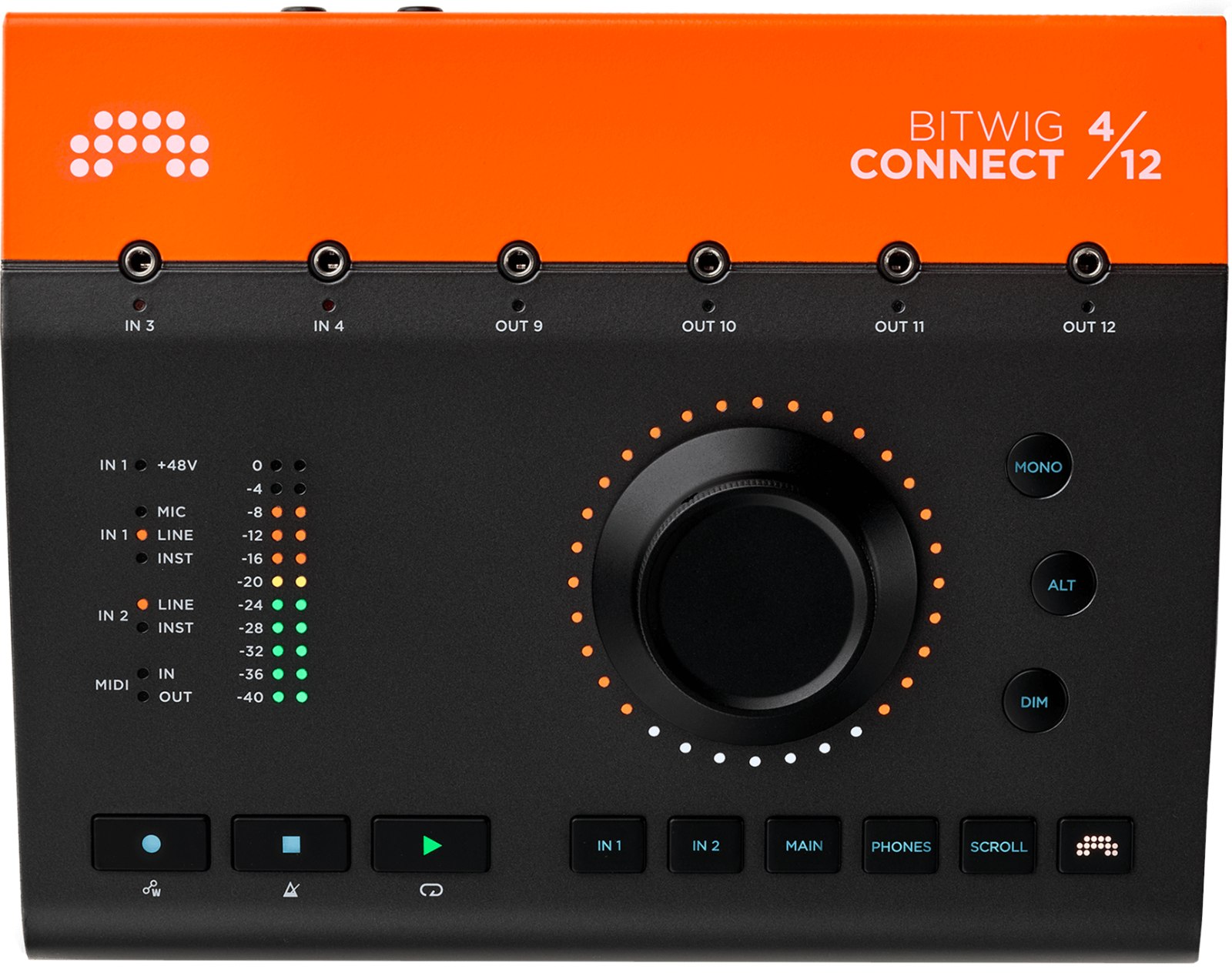
  • 360-degree touch wheel + RGB LED ring: ultra-precise adjustments, immediate visual feedback (32 LEDs), and front-panel input/output indicators.
  • Dedicated Bitwig Studio integration: transport, timeline navigation, automation writing, and contextual parameter control under the cursor.
  • Modular-ready CV: 2 CV inputs and 4 CV outputs on 3.5 mm mini-jack, factory calibrated for consistent behavior from the first session.

Bitwig Connect: a control center designed for Bitwig Studio

Bitwig Connect positions itself as a hardware hub designed to streamline the use of Bitwig Studio, while remaining a full-featured, class-compliant audio/MIDI interface. Its "all-in-one" approach combines 24-bit/192 kHz conversion, monitoring control (speakers and headphones), and DAW control in one place to reduce mouse/keyboard back-and-forth and keep key settings at hand. A particularly practical feature: gain values can be accessed and saved within Bitwig Studio, allowing you to resume a project with consistent settings.

Who is it for and what are its uses?

This interface is aimed at producers and musicians who primarily work in Bitwig Studio and want a compact control surface, as well as hybrid software/hardware users. Thanks to the CV connectivity, Bitwig Connect is well suited for setups with modular synths, hardware sequencers, and external modulation sources, while remaining relevant in a home studio for recording vocals/instruments via its mic/line/instrument inputs. In mixing setups, it also serves as a volume controller for two pairs of speakers and one headphone, ideal for quickly switching between two listening sources.

A tactile controller, monitoring, and CV in a single unit

High-resolution DAW control

With its dedicated modes, the high-resolution main wheel allows managing transport functions, finely adjusting parameters, and writing automations with precision. In Bitwig mode, any parameter hovered by the mouse can be controlled from the wheel, and it is possible to lock a selected parameter to maintain control even when changing selection. The LED ring reflects the color of the parameter or track in Bitwig Studio for immediate identification.

CV gateway and additional inputs/outputs

The front-panel CV mini-jacks speed up patching and encourage creative routings: sending signals from Bitwig Studio to external gear, or capturing hardware modulations and sequences into the software. Since CV jacks can also carry audio, they can serve as additional line-level inputs/outputs according to your needs, making the device useful even outside modular contexts.

Technical Specifications

Audio Interface and Conversion

  • USB audio interface
  • Resolution: 24-bit/192 kHz
  • USB-C port
  • USB-powered
  • Class Compliant - compatible with PC, Mac, and Linux

Bitwig Integration and Control

  • With CV and Bitwig integration
  • Bitwig integration for transport functions, precise parameter adjustment, and automation writing
  • In Bitwig mode, all parameters under the mouse pointer can be controlled with the main wheel, including parameter locking

Audio Inputs

  • Microphone/line/instrument input with 48 V phantom power on combined XLR/6.3 mm stereo jack
  • Line/instrument input on 6.3 mm stereo jack
  • 2 line inputs on 6.3 mm stereo jack
  • 2 CV inputs on 3.5 mm stereo mini-jack

Audio Outputs

  • 6 line outputs on 6.3 mm jack
  • 4 CV outputs on 3.5 mm stereo mini-jack
  • Headphone output on 6.3 mm stereo jack
  • Monitor controller function

MIDI

  • MIDI input/output on 3.5 mm stereo mini-jack

Included Accessories

  • USB-C cable
  • USB-A adapter
  • 2 mini-jack 3.5 mm cables
  • 2 mini-jack to MIDI cables
  • Bitwig Studio Essentials and Bitwig Circle subscription

Dimensions and Weight

  • Dimensions (W x H x D): 205 x 52 x 163 mm
  • Weight: 1.48 kg
Brand reference number: BIT-600-002
Videos
Sales & Advice
thumb_up