close
filter_list

Waves X-Fdbk

Description

The Essentials to Know About Waves X-FDBK Software

  • Automatic Feedback Elimination: detects the exact feedback frequencies and instantly attenuates them for cleaner live sound.
  • More Usable Volume: recovers several dB of headroom before feedback occurs, ideal for stage monitors and front-of-house playback.
  • Up to 20 Notch Filters: precise and surgical processing, automatically optimized (bandwidth and cut depth).
  • "Set-it-and-forget-it" Workflow: quick ring out of PA and monitors with a single operator, then focus on the mix.

What Waves X-FDBK Is For

Waves X-FDBK is a plugin designed to automatically eliminate feedback during live performances, rehearsals, fixed installations, and events where fast setup is essential. It is typically used on monitor buses, an auxiliary output, or the broadcast chain to achieve higher levels and better intelligibility without engaging in lengthy and risky manual equalization. Whether you are a front-of-house engineer, stage manager, self-sufficient musician, or technician on a fast-changing stage, X-FDBK speeds up the ring out process and ensures system stability.

Main Features

Ultra-Targeted Feedback Frequency Detection

X-FDBK identifies the precise frequencies responsible for feedback and applies narrow notch cuts surgically. The goal is to reduce feedback while preserving the character of the signal, avoiding overly broad equalizations that dull the sound of voices and instruments.

Automation for Faster Setup

The plugin is designed for field use: once inserted, it allows you to ring out the PA and monitors quickly without multiple adjustments. This "set-it-and-forget-it" approach shortens soundcheck time and helps start mixing earlier with an already stabilized system.

Up to 20 Filters and Global Control

With up to 20 filters available to handle problematic frequencies, X-FDBK provides ample headroom for challenging stages (sensitive microphones, close wedges, complex acoustics). Global filter controls also allow reacting to unexpected changes during the show (microphone movement, level variation, placement modification).

Visual Analysis and Immediate Playback

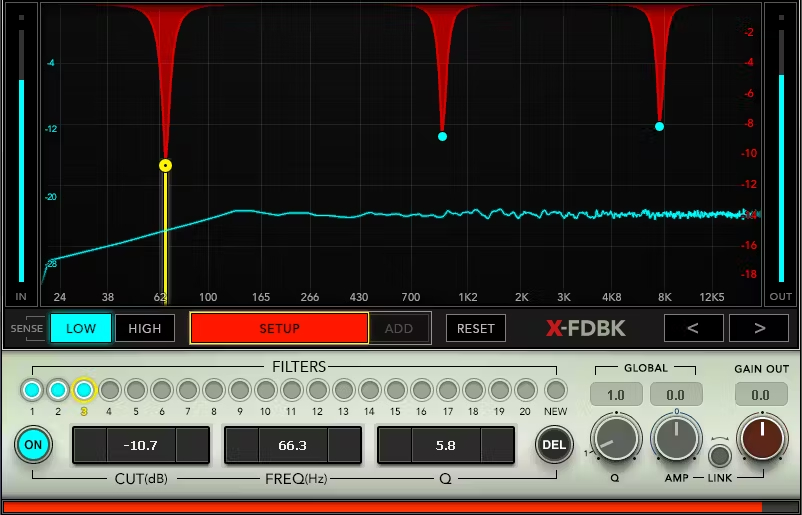
The built-in display analyzes incoming audio and overlays the notch filter responses. This visualization helps quickly understand what is happening in the system, validate the plugin's automatic work, and keep a clear view of the treated areas.

Technical Specifications

System Requirements

  • Mac: macOS Catalina 10.15, Big Sur 11, Monterey 12, Ventura 13, Sonoma 14
  • Windows: Windows 10 64 bit, Windows 11
  • Memory: 8 GB
  • Mac Processor: Intel or Silicon Architecture
  • Windows Processor: X64 compatible Intel or AMD CPU

Supported Plugin Formats

  • Mac: VST-3, AU, AAX
  • Windows: VST-3, AAX

Features

  • Automatic feedback elimination by identifying problematic frequencies
  • Clearer and louder sound on monitors and FOH thanks to increased headroom before feedback
  • Recovery of several dB of headroom before feedback onset
  • Up to 20 filters available for notch filtering feedback frequencies
  • Automatic optimization of filter bandwidth and cut level
  • Global filter controls to adapt to unexpected changes
  • Incoming audio analyzer display with overlay of notch filter responses
  • Automated ring out procedure achievable by a single operator
Brand reference number: 1178-3021
Videos
Sales & Advice
thumb_up