Essential Information About Waves X-Noise Software
- Broadband noise reduction based on a "noiseprint" to remove hiss, hum, and constant noises.
- Ultra-fast workflow: select a noisy section, press the Learn button, then make fine adjustments to preserve the timbre.
- Dynamic processor-style controls (Threshold, Reduction, Attack, Release) to dose the reduction musically.
- Monitoring and analysis tools: spectral display, Difference mode, two storable noise profiles, and factory presets.
What Waves X-Noise Is Used For
Waves X-Noise is an audio restoration and noise reduction plugin designed to clean recordings containing regular background noises: preamp hiss on a vocal, tape hiss, computer fan noise, air conditioning, room noise, or rumble captured on a microphone take. It is used both in post-production (dialogues, podcasts, archives) and music production, on isolated tracks (vocals, guitar, home-studio recorded instruments) or directly on a full mix when the noise is continuously present.
Its "noiseprint" approach is ideal when you can isolate a short passage where the noise to be removed is predominant. X-Noise then learns the noise signature and intelligently subtracts it from the signal to avoid re-recording, while preserving maximum naturalness in transients and brightness.
Main Features
Noiseprint-based reduction
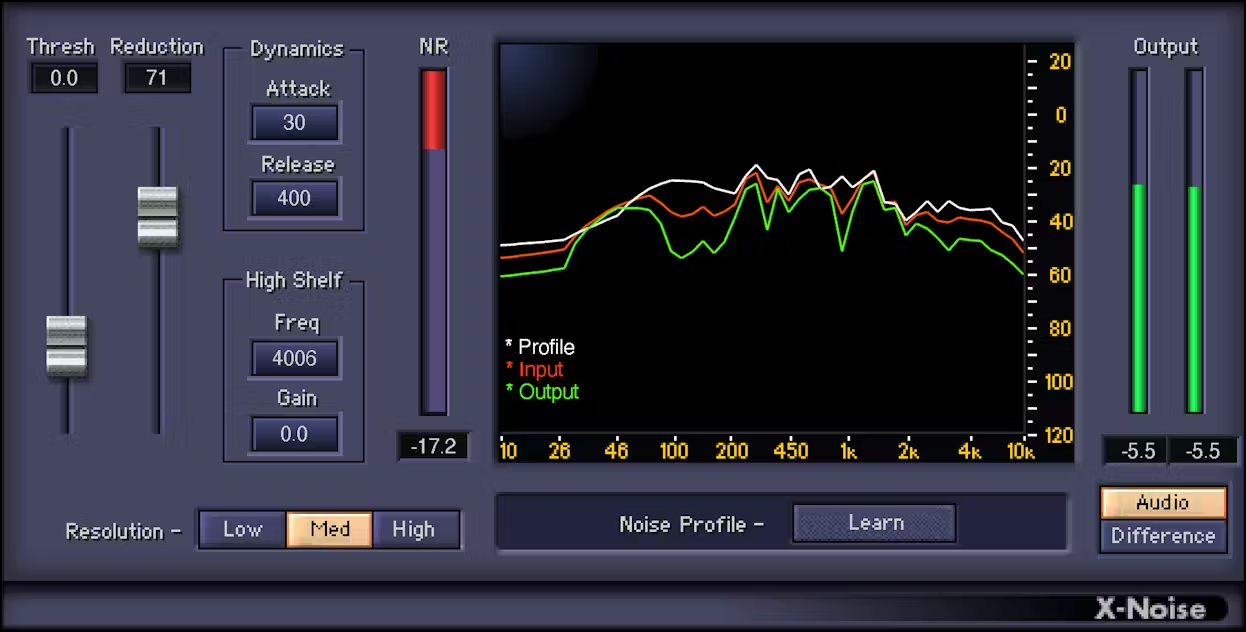
The core of X-Noise relies on learning a noise profile. In practice, you identify a fragment containing hiss, fan noise, or background noise, start the learning process, then apply the reduction over the entire passage. This method precisely targets the problematic noise and limits artifacts, making it an effective tool for "imperfect" but usable takes.
Simple settings, precise results
The plugin follows a logic similar to a dynamic processor: you control the amount of reduction and set the level at which the processing should engage. Attack and release parameters help smooth the processing action to avoid an overly aggressive result, particularly useful on rich sources like lead vocals, overheads, or a guitar with high-gain amp simulation.
Analysis, comparison, and sound design
X-Noise offers a spectral display to visualize the noise energy in the spectrum and guide your adjustments. You can also store two noise profiles to quickly compare two learnings (or two sound scenes) and choose the most transparent compromise. The "Difference" mode allows you to listen only to what is removed: an excellent way to verify that you are not removing useful elements (air, consonants, attacks), and an interesting option for creative uses in sound design.
- Threshold and Reduction to focus the amount of reduction where the noise appears.
- Attack and Release to soften and stabilize the processing behavior.
- Two savable noise profiles for quick comparisons and consistency across a project.
- Difference mode to monitor only the removed noise (quality control and sound creation).
- Spectral display for visual feedback based on frequencies.
- High-shelf filter to boost or attenuate high frequencies.
- Resolution optimization oriented towards frequency or temporal processing depending on the source.
- 13 factory presets for cases when isolating the noise for learning is difficult.
Technical Specifications
Product Type
- Broadband noise reduction plugin based on "noiseprint"
- Usage: individual tracks, full mixes, damaged recordings
Features
- Simple and intuitive controls inspired by dynamic processors
- Threshold and Reduction controls to adjust the reduction amount
- Attack and Release parameters to smooth the reduction
- Save 2 noise profiles for comparison
- "Difference" mode: listen only to the removed noise
- Spectral display with frequency-based visual feedback
- High-shelf filter: boost or cut high frequencies
- Resolution setting: frequency or time domain optimization
- 13 factory presets when noise cannot be isolated
System Requirements - Mac
- System: macOS Catalina 10.15
- System: macOS Big Sur 11
- System: macOS Monterey 12
- System: macOS Ventura 13
- System: macOS Sonoma 14
- Memory: 8 GB
- Processor: Intel or Silicon Architecture
- Plugin formats: VST-3, AU, AAX
System Requirements - Windows
- System: Windows 10 64 bit
- System: Windows 11
- Memory: 8 GB
- Processor: X64 compatible Intel or AMD CPU
- Plugin formats: VST-3, AAX
 en
en