30-day satisfaction guarantee or your money back
Call us : +33 257 880 074
 en
en 









Complete software

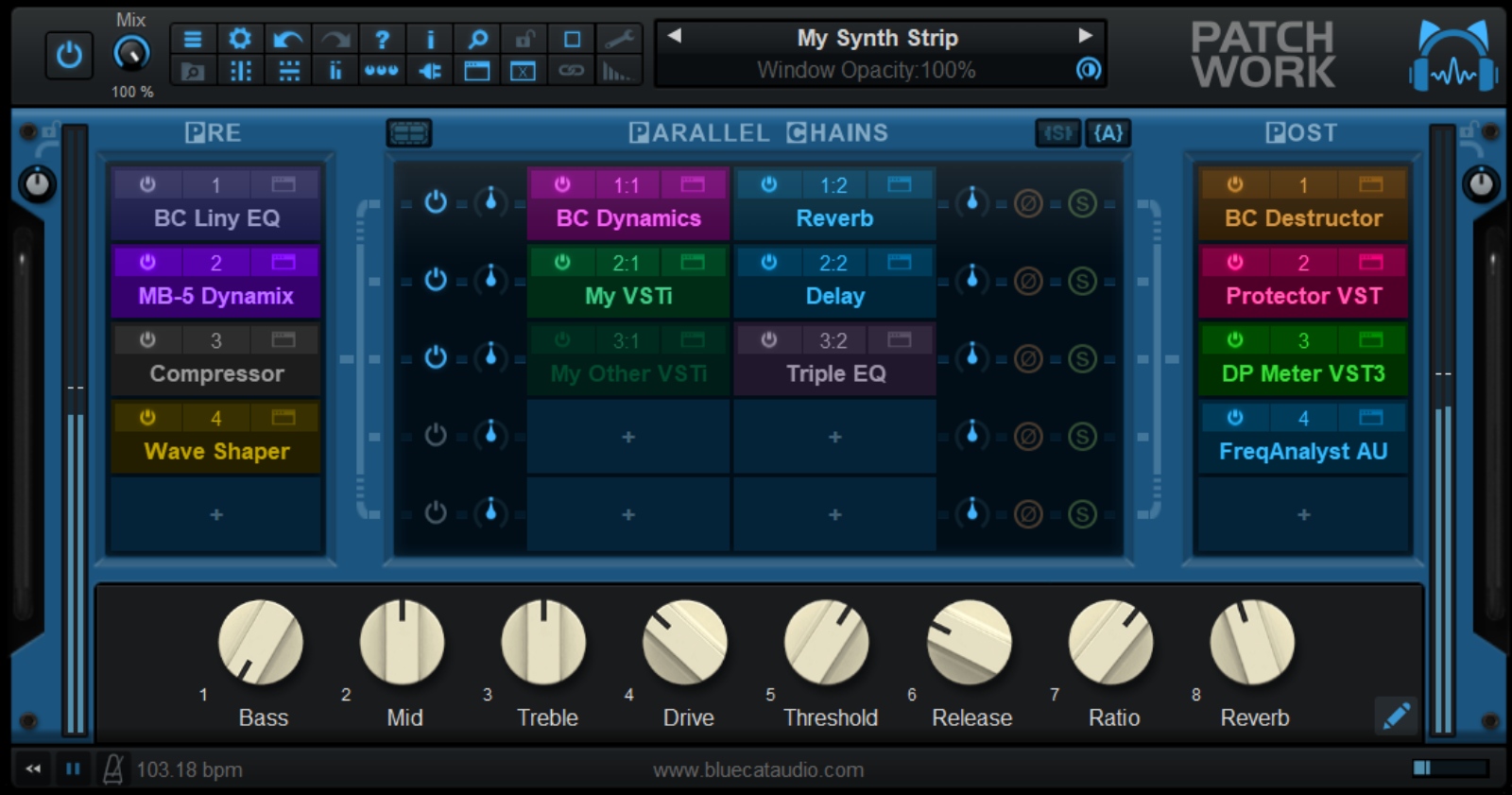
Blue Cat PatchWork is a universal plug-in host (virtual patchbay) designed to centralize your audio processing and virtual instruments into a single module. It inserts as an effect or instrument in your digital audio workstation and allows you to build complex chains, recall them instantly, and share them across different environments-even if you change plug-in formats.
It is the ideal tool to optimize a mix, structure sound design, stack creative processing, manage multi-instrument setups, or secure a consistent workflow across multiple DAWs. Whether in the studio or live, PatchWork becomes a unique, clean, and fast-to-control "rack."
PatchWork can host up to 64 plug-ins (VST, VST3, Audio Unit, or built-in effects) within a single instance. You can chain effects in series or build up to 8 parallel chains independently activatable, with gain, solo, and phase inversion controls to maintain signal control in any situation.
Routing is cable-free: you configure audio flow by adding or removing rows and columns in the matrix. The result: advanced setups (creative multiband, instrument layers, parallel processing) without complicating the session with multiple buses.
Save your effect or instrument configurations as presets and recall them with one click. Chains can be reused from session to session and shared between different production environments, facilitating a consistent workflow in composition, mixing, or mastering.
Each slot benefits from essential tools: individual bypass, preset management, audio input/output selection, and integrated undo/redo. PatchWork also remembers plug-in window positions to restore your layout when opening the project or loading a preset.
Automate hosted plug-in parameters via PatchWork's mapping capabilities: group key controls (filter, drive, compressor threshold, reverb mix, etc.) on Macros for clear and efficient control. Controls can be assigned to a control surface, DAW automation, or MIDI (MIDI Learn).
The plug-in also provides virtual MIDI ports to enable communication between sub-plug-ins or with the host. Depending on the setup, it becomes possible to manage scenarios like stacked instruments, MIDI effects, or hybrid audio/MIDI routings within a single instance.
PatchWork provides input and output vu-meters to monitor the signal sent to plug-ins, including via side chain and auxiliary channels. Processing automatically stops during silence to optimize CPU usage, and a usage indicator is available. It works at any sample rate.
The software also exists as a standalone application, convenient for using your chains outside a DAW. It can handle up to 16 audio channels and, depending on the publisher (version 2.75), allows WAV output recording up to 16 channels, with transport position metadata (BWF format) to facilitate resynchronization in a session.