Essential Information About MAGIX Video deluxe 2026 Plus (UPG) Software
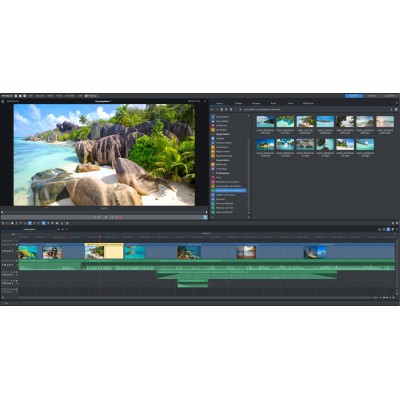
- Fast and intuitive editing thanks to the all-in-one media window: everything is at your fingertips to cut, color grade, and stylize your clips.
- Integrated AI tools: multilingual automatic subtitles, realistic voiceovers, and image enhancement for effortless professional results.
- 2026 new features: AI media management (intelligent categorization) and synchronized highlighting function for impactful subtitles.
- Over 2,000 effects, titles, and transitions, built-in stabilization, and ultra-fast export via the INFUSION engine.
Requirements According to License Type
This UPG (upgrade) edition is reserved for holders of a qualifying previous MAGIX Video deluxe license (e.g., Plus/Premium). During activation, a valid serial number from a previous version may be required. If you do not own a previous version, please choose the standard version.
What MAGIX Video deluxe 2026 Plus Is For
Designed for content creators, videographers, and communicators, Video deluxe 2026 Plus simplifies video editing for YouTube, TikTok, Reels, presentations, or personal films. It combines precise cutting, graphic titling, color grading, and optimized export, while offering AI tools to automate repetitive tasks and speed up your workflow.
Main Features
All-in-One Interface
The media window centralizes media, effects, titles, and settings. Navigate without losing track: adjust colors, apply filters, and chain your transitions all in one place for a smooth workflow.
AI for Voiceover and Subtitles
Generate natural voiceovers and accurate subtitles in just a few clicks. The new Highlight feature emphasizes words in sync with the audio, and transcript export facilitates closed captions on social platforms.
AI Media Management
Automatically categorize your footage into main categories like "Person" or "Nature." Instantly find your shots even in large projects and focus on storytelling.
Creative Color Grading
Utilize flexible color correction to set the mood of your videos, harmonize varied sources, and create consistent cinematic looks.
Performance, Multicam, and Effects
Edit up to 4 cameras in multicam mode, stabilize your shots, and enjoy over 2,000 titles, templates, and filters. The INFUSION engine accelerates playback and export to save time on every render.
Content and Cloud
Access MAGIX Content with over 1.5 million royalty-free assets (videos, music, sound effects, animations) and enrich your projects via the integrated store. Save and share your files using the cloud space.
Technical Specifications
System Requirements (Windows)
- System: Windows 10 or Windows 11
- Processor: Intel Core i5 6th generation or AMD equivalent
- Memory: Minimum 8 GB RAM
- Storage: 2 GB for installation (additional space required depending on projects and content)
- Internet Connection: Required for activation, updates, AI features, and content downloads
Features
- All-in-one media window for faster editing
- Automatic generation of subtitles and voiceovers via AI, transcript export
- Synchronized subtitle highlighting function
- Advanced color grading and look harmonization filters
- Multicam editing up to 4 cameras
- Built-in image stabilization
- INFUSION engine for smooth playback and accelerated export
- Over 2,000 effects, transitions, templates, and titles
- Project, sequence, and export templates (including vertical formats for social media)
- AI media management with intelligent categories (e.g., "Person," "Nature")
Included Content
- MAGIX Video deluxe 2026 Plus upgrade license (download)
- Access to MAGIX Content (over 1.5 million royalty-free assets, subject to availability)
- In-app store for extensions and additional content
- Cloud space for file sharing and synchronization
License Type
- UPG (Upgrade): requires a qualifying previous MAGIX Video deluxe license (Plus/Premium). Serial number verification during activation.
- Individual license; use and conditions subject to the manufacturer's license agreement.
 en
en