close
Info
close
close
My shopping cart

Your Shopping Cart is empty...

Total:
0
close
My favourites
Your list of favourites is empty
close

LANGUAGES

France
English Version
België
Nederland
Luxembourg
Portugal
Italia
Deutschland
Österreich
España
favorite_border
favourites
icon-cart
Basket
close
filter_list

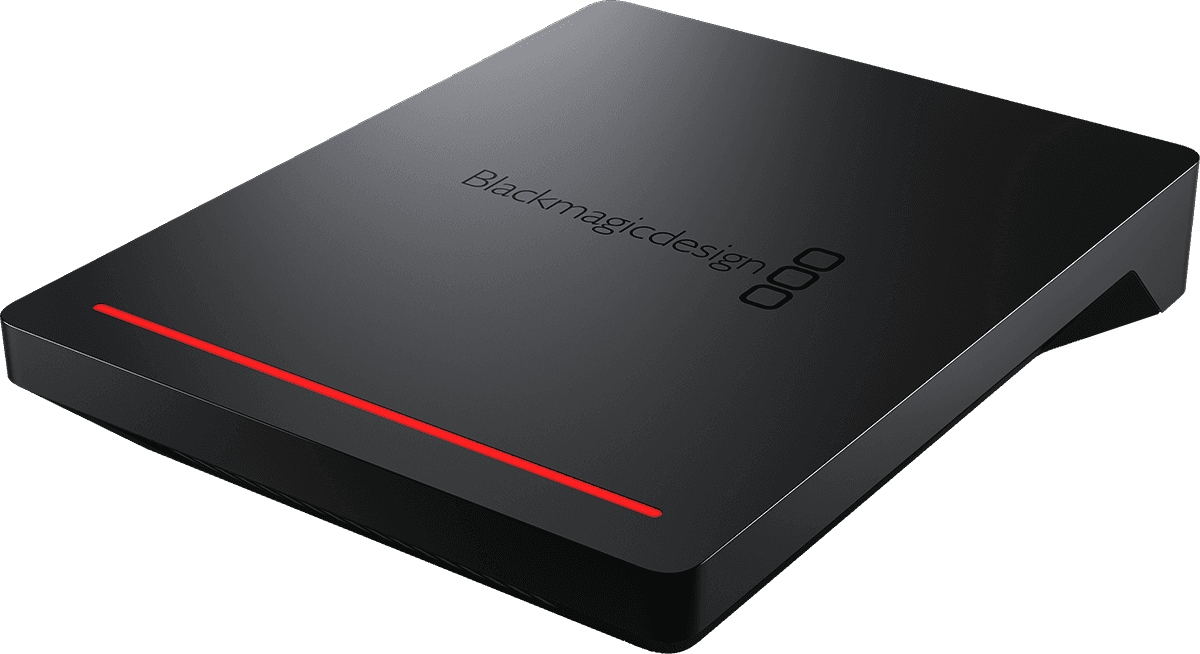
Blackmagic Design Cloud Pod

380
or
icon-cart Add
favorite_border
Online : within 4 weeks
shipping icon
Shipping: Shipping cost calculated on next step
warranty icon
This item is warranted for 3 years
reference icon
Ref.: 365780
Register here and stay informed about the next restock

Description

The Essentials to Know About the Blackmagic Network Storage Gateway "Cloud Pod"

  • Instant 10G Network Sharing: transforms your USB-C drives into shared storage via 10G Ethernet, ideal for speeding up media exchanges in the studio.
  • Universal NFS and SMB Compatibility: supports up to 50 simultaneous connections for reliable multi-workstation workflows on macOS and Windows.
  • Built-in HDMI Monitoring: displays real-time activity, users, network throughput, hardware status, and Cloud synchronization on a dedicated screen.
  • AWS S3 Cloud Synchronization: facilitates backup, remote access, and file sharing (projects, proxies, deliverables) without complicating infrastructure.

A Compact "BYOD" Approach in the Blackmagic Cloud Range

The Blackmagic Cloud Pod holds a unique position in the Blackmagic Cloud ecosystem: whereas more traditional network storage solutions require a chassis, disk bays, or RAID management, this model embraces a "bring your own disk" philosophy. Practically, you plug in your existing USB drives and immediately make them accessible on the local 10G network. This approach allows building a scalable shared storage solution tailored to the real needs of a team, while maintaining a lightweight installation and minimal maintenance.

In a modern production environment, the strength of the Cloud Pod is acting as a simple gateway between your USB-C media and a high-speed Ethernet network, with the added benefit of a Cloud synchronization layer designed for collaboration. The result: a particularly relevant tool for centralizing media, streamlining back-and-forth between workstations, and securing key project elements.

For Which Users and Studio Workflows?

The Blackmagic Cloud Pod is aimed at post-production studios, control rooms, schools, content creators, and technical teams who need to share large files without wasting time on manual copying. It is an efficient solution for video editing, color grading, media preparation, rush archiving, as well as audio contexts where multiple stations need access to the same sessions, stems, or exports.

In daily use, it meets very concrete needs: enabling an editor and assistant to access the same folders on the network, providing a shared space for an editing suite, or creating a synchronization point to the Cloud for proxies and deliverables. Perceived latency is reduced thanks to the 10G link, and NFS/SMB compatibility facilitates integration into mixed environments (macOS and Windows) without changing work habits.

Features Tailored for Collaboration, from Local to Cloud

10G Ethernet for Fast Transfers and True Multi-User Access

The Cloud Pod's 10G Ethernet port is designed to support shared usage: multiple users can read and write files on the same storage, with network throughput suited to current media demands. The 100/1000/10G BASE-T compatibility also allows gradual integration into an existing infrastructure, whether you are already on 10G or transitioning. On the protocol side, NFS and SMB ensure solid interoperability and stable connection across major working environments.

HDMI Monitoring: Immediate Visibility on Activity and System Status

In production, knowing "what's happening" is as important as speed. The dedicated HDMI output displays all useful information on a screen: device name, storage capacity and usage, user activity, memory topogram, network throughput graphs, hardware status, as well as Cloud synchronization status. On the front panel, the red status light bar activates during read/write operations, handy for spotting disk activity or ongoing transfers at a glance.

AWS S3 Synchronization and Blackmagic Tools to Simplify Operations

The Cloud Pod integrates synchronization with Amazon Web Services S3, designed to secure your media and facilitate remote collaboration. Depending on your setup, this can be used to push proxies, back up production folders, or make certain files accessible outside the local network. Configuration and monitoring rely on the Blackmagic Cloud Setup utility, while Blackmagic Proxy Generator Lite supports proxy generation to accelerate collaborative workflows. Updates and settings can be done via USB-C or directly through Ethernet, allowing you to keep the device up to date without disrupting the studio.

Technical Specifications

Connections

  • 10G Ethernet Ports: 1 x Ethernet compatible with 100/1000/10G BASE-T.
  • USB-C Port: 2 x USB 3.0 (up to 5 Gb/s) for external storage.
  • HDMI Monitoring Outputs: 1.
  • Computer Interface: Ethernet for access to shared files, configuration, and software updates; USB-C for software updates and configuration.

Network and Sharing

  • Sharing Protocols: NFS, SMB.
  • Computer Connections: up to 50 maximum.

Cloud Synchronization

  • Supported Service: Amazon Web Services S3 (synchronization).

Storage

  • Type: BYOD ("bring your own disk").
  • External Storage: USB drives.
  • File Systems: ExFAT (Windows/Mac) or HFS+ (Mac).

Display and Monitoring

  • HDMI Output Standards: 1080p50, 1080p59.94, 1080p60.
  • Monitoring Screen: device name, storage capacity and usage, Cloud synchronization status, user activity, hardware status, memory topogram, network throughput graphs.
  • Status Indicator: red light bar during write/read operations.

Control and Configuration

  • External Control: via USB-C or Ethernet for updates and configuration.

Software and Compatibility

  • Included Software: Blackmagic Cloud Setup utility, Blackmagic Proxy Generator Lite.
  • Firmware Updates: via Blackmagic Cloud Setup through USB-C port.
  • Operating Systems: macOS 14.3 Sonoma or later; Windows 10 64-bit; Windows 11.

Power and Consumption

  • Power Supply: 1 x 60 W DC 12 V external power brick.
  • Power Input: 1 x secure 5.5 mm cylindrical connector DC 12 V.
  • Typical Consumption: 25 W without external USB drive.

Environmental Specifications

  • Operating Temperature: 0 to 40 degC.
  • Storage Temperature: -20 to 60 degC.
  • Relative Humidity: 0% to 90% non-condensing.

Included

  • Blackmagic Cloud Pod.
  • Universal power supply with locking connector and international adapters.
  • Welcome pack with QR code to download software.
Brand reference number: DWCLDA/POD
Videos
Sales & Advice
thumb_up