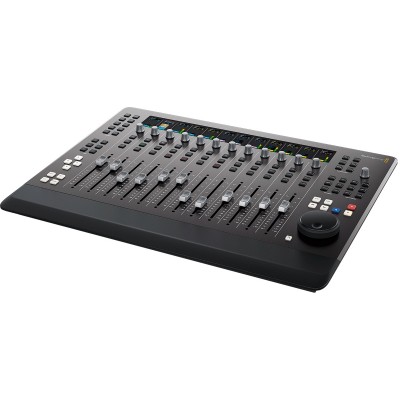
Key Information About the Fairlight Desktop Console Control Surface
- 12 ultra-smooth motorized faders with channel LCD screens for levels, track name, and panning.
- Direct control of Pan, Solo, Mute, dynamics, equalization, and plug-in parameters via rotary encoders and illuminated buttons.
- Integrated HDMI output for instant graphical feedback of channels, buses, and effects up to 1080p60.
- Modern connectivity USB?C and Ethernet, professional internal power supply, and simple USB-based updates.
A Concentrate of Fairlight Expertise, in a Desktop Format
Designed for Fairlight audio workflows, the Desktop Console adopts the ergonomics of large modular consoles in a compact chassis. It creates an efficient bridge between mouse/keyboard and a high-end mixing surface, providing dedicated controls, advanced metering over HDMI, and a layout familiar to broadcast, post-production, and music mixers.
Who Is It For and What Are Its Uses?
Ideal for post-production studios, broadcast control rooms, location sound editors, and mixers, it accelerates the shaping of dialogue, FX, and music. The motorized faders enable precise automation, while the encoders and dedicated keys offer immediate access to essential processing without digging through software menus.
Ergonomics and Key Features
Faders and Channels
Twelve motorized faders provide precise movement for rides and automation. Each channel strip features an LCD screen (?scribble strip?) displaying level, track name, and pan to stay focused on the mix. Solo/Mute buttons and Pan control are directly at hand.
Advanced Processing Control
Rotary encoders and illuminated buttons ensure fine adjustments of dynamics, equalization, and plug-ins. Channel bank and layer changes happen quickly to cover large sessions without losing track.
Real-Time Display and Monitoring
The Type A HDMI output delivers comprehensive visual feedback of channels, buses, and effects. Formats up to 1080p60 guarantee perfect readability of meters and routing on an external monitor.
Simple Integration, Reliable Deployment
The USB?C connection ensures direct integration with the computer, while 10/100/1000 Base?T Ethernet facilitates network integration. Updates and configuration are done via USB, with an internal IEC power supply for clean and robust installation in studio or control room.
Technical Specifications
Connections
- Computer interface: 1 x USB Type C.
- Ethernet: 10/100/1000 BaseT.
- Video output: 1 x HDMI Type A.
- Updates and configuration: 1 x USB?C for configuration and software updates.
Video
- HDMI video standards: 1080p23.98, 1080p24, 1080p25, 1080p29.97, 1080p30, 1080p50, 1080p59.94, 1080p60.
Supported Software and Systems
- Firmware updates via the update application.
- Configuration utility: ?Fairlight Studio and Console Setup? when connected via USB.
- macOS: 13.0 Ventura, 14.0 Sonoma or later.
- Windows: 10 Creators Update, 11.
- Linux: Rocky Linux 8.6.
Power Supply
- Internal power supply: AC 100?240 V, 50/60 Hz, IEC C14 power inlet.
- Power consumption: 20 W max.
Environmental Specifications
- Operating temperature: 0° to 40°C (32° to 104°F).
- Storage temperature: ?20° to 60°C (?4° to 140°F).
- Relative humidity: 0% to 90% non-condensing.
Included
- Fairlight Desktop Console.
- 1.5 m USB?C cable.
 en
en