30-day satisfaction guarantee or your money back
Call us : +33 257 880 074
 en
en 










Complete software

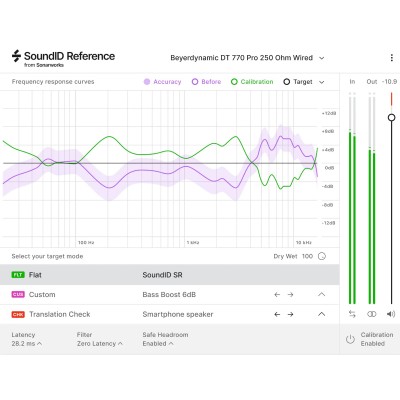
This plugin is designed to improve the accuracy of headphone monitoring by correcting the colorations specific to each model. It is intended for producers, sound engineers, composers, and content creators working in home studios, on the go, or in environments where speaker listening is not always possible. By making the headphone's sound signature more neutral, it becomes easier to judge tonal balance, vocal presence, bass management, as well as the coherence of reverbs and panning.
The core of the workflow relies on frequency response correction of the headphones to achieve a more linear listening experience. The plugin is based on dedicated calibration curves (over 280 models), allowing for a consistent working basis from one headphone to another. To refine the sound according to your listening preference or musical style, the target curves can be adjusted individually in real time, which is convenient for quickly adapting the perception of bass or brightness without altering the mix itself.
The Translation Check function simulates more than 20 devices and device types to monitor how your mix will behave in various listening contexts. This is a major asset for spotting excessive low-mids, overly present sibilance, or a kick/bass balance that collapses on small systems. This approach speeds up decision-making and limits back-and-forth between headphones, speakers, and consumer systems.
Depending on the situation, you can choose between three filter modes: Zero Latency, Mixed, and Linear Phase. The goal is to balance filter quality and latency: a very responsive mode for recording and tracking, or a more demanding mode for phase accuracy during mixing. Additional settings enhance control: Mono for compatibility checking, Dry/Wet to adjust the intensity of the correction, and Safe Headroom to preserve a safety margin and avoid level surprises during monitoring.
In addition to the plugin, some options are accessible only via the application: MIDI mapping of parameters and user presets for quickly recalling predefined output configurations. A significant time saver if you switch between multiple headphones, audio interfaces, or uses (editing, mixing, reference listening).